Ableton Live · set builder
StitchAble merges your individual song projects into one combined Live set right order, right keys, with tempo, meters, and section markers intact. Bring your own Live sets or drop in MultiTracks.com downloads; it converts and folds them in automatically. Open the result in Live and play. It assembles the songs you already have, it doesn't create them.
Build up to 10 sets free · macOS · signed & notarized by Apple
Four songs
↓ merge ↓
One set
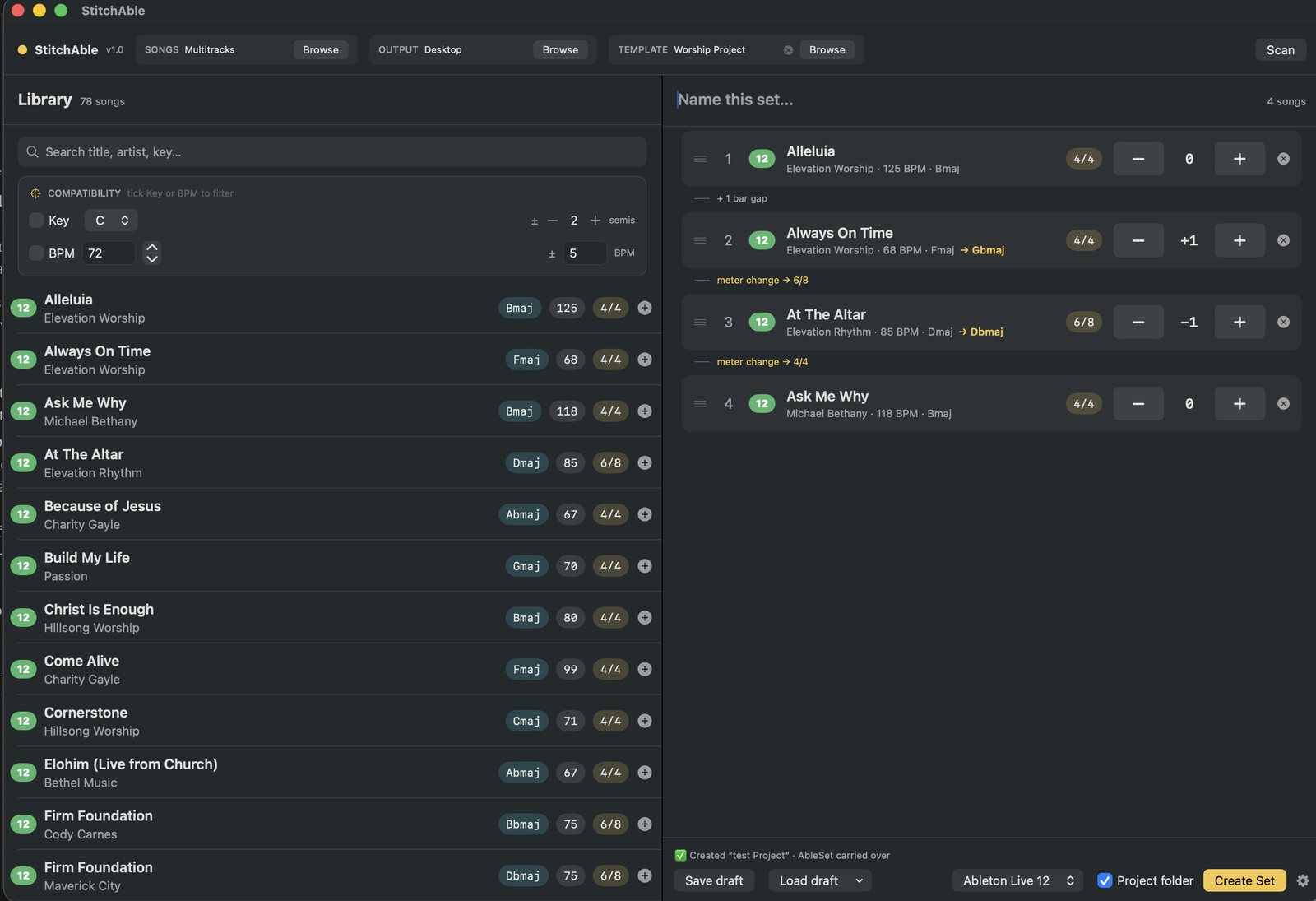
Your library on the left. The set on the right. One button.
Watch it
The night-before scramble
Every song lives in its own .als. Come show day you need them stitched into one set, right order, right keys, tempo map and markers intact. By hand that means copying tracks between projects, fixing tempo automation, re-dropping locators, and transposing clip by clip.
StitchAble does it in a few clicks. Direct it to your song folder, drag the songs into order, set any transpositions, hit Create Set. Open the result in Live and run.
What it does
Tempo, time signature, and section locators carried into the combined set exactly as they were, not flattened, not guessed.
Per-song transpose shifts audio and MIDI, and rewrites the key in each song's marker so the set reads right in Live. Running a song slower than it was recorded? Switch to a pitch plugin and the warp engine stays out of it.
Tag drums, loops, and percussion [noshift] and they stay untouched while pitched instruments move.
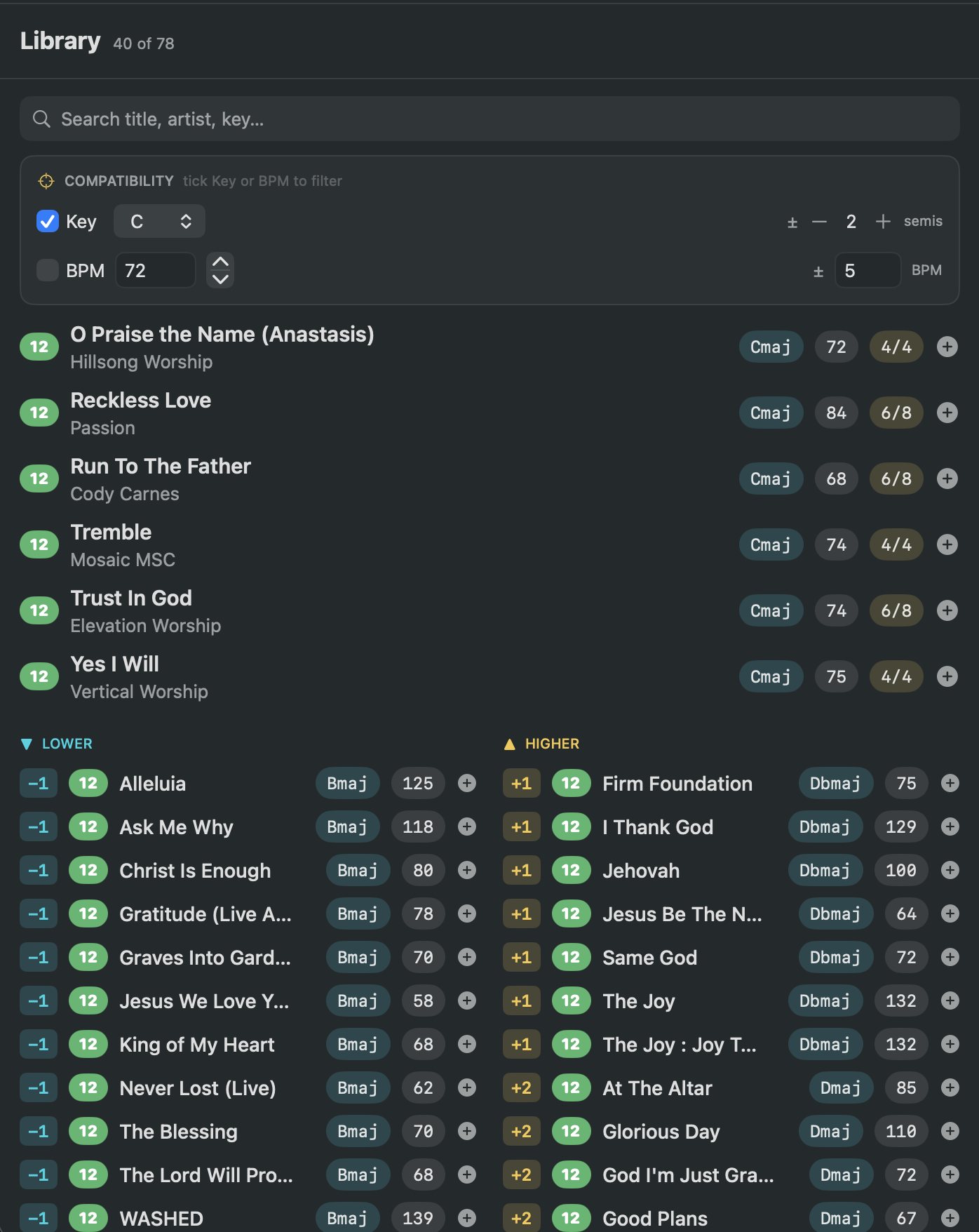
A key-compatibility view groups your library by what's in key and what sits a semitone or two away. Filter by tempo, search instantly.
Drag songs into the set, reorder, set transpositions inline, and see each destination key and meter change right in the list.
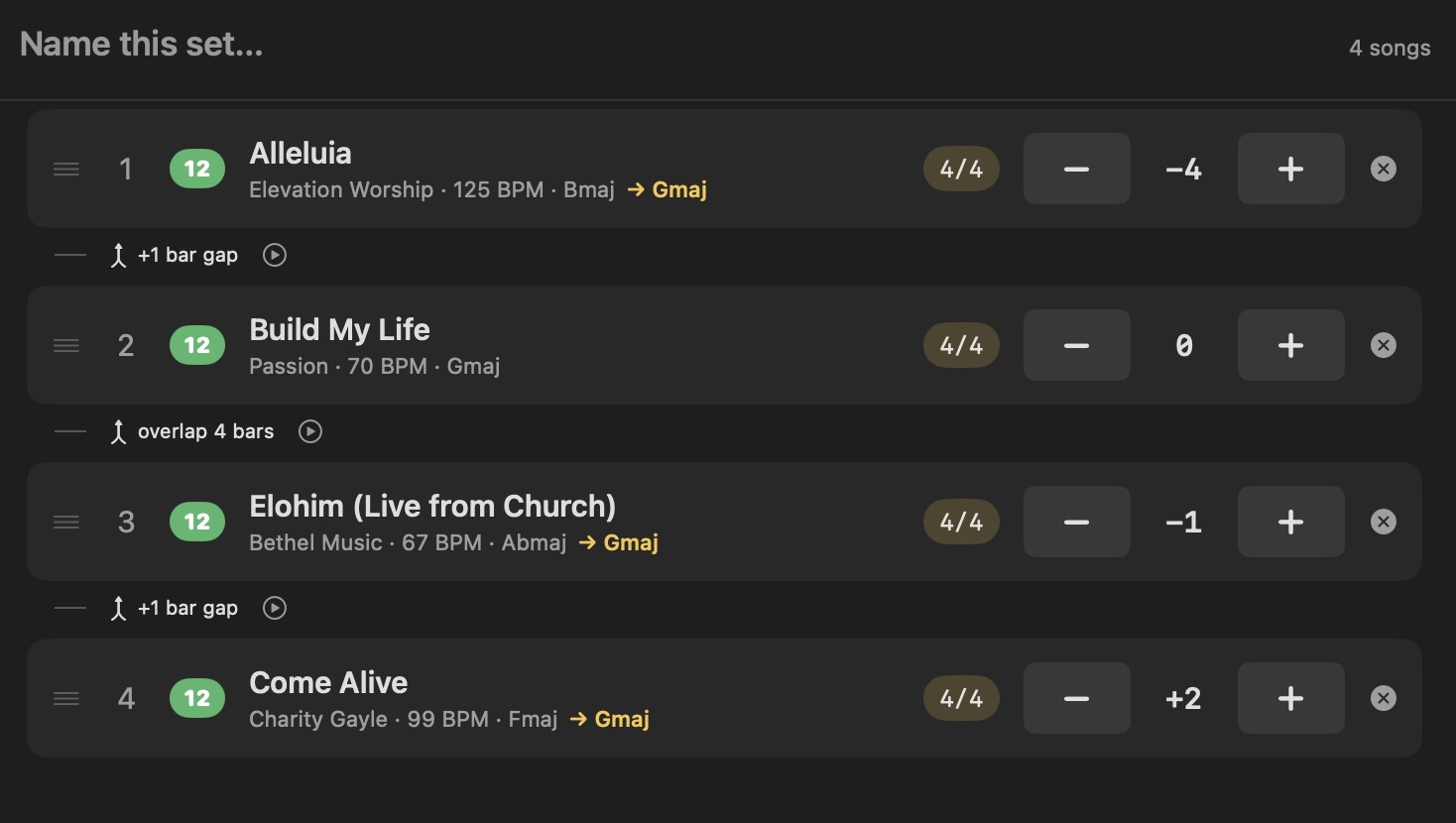
Set how each song joins the last: a bar of gap, gapless so the next starts the instant this one ends, or an overlap where the outgoing song's final bars play under the one coming in. Both at their own tempo, nothing stretched.
A play button on every transition auditions the seam in a couple of seconds, the outgoing tail meeting the incoming start, in the key and overlap you chose, without building the whole set.
Last week's running order is one click away in the Recent menu. Reopen it, adjust, and rebuild instead of starting the set from scratch every time.
Create a proper Ableton project folder with your AbleSet config carried from a template, or a plain .als if that's all you need.
Unzip a MultiTracks.com download into your songs folder and leave it alone. StitchAble spots the Live 8 set they ship, converts it into a clean modern Live project, and merges it right alongside your own songs. No renaming, no conversion step.
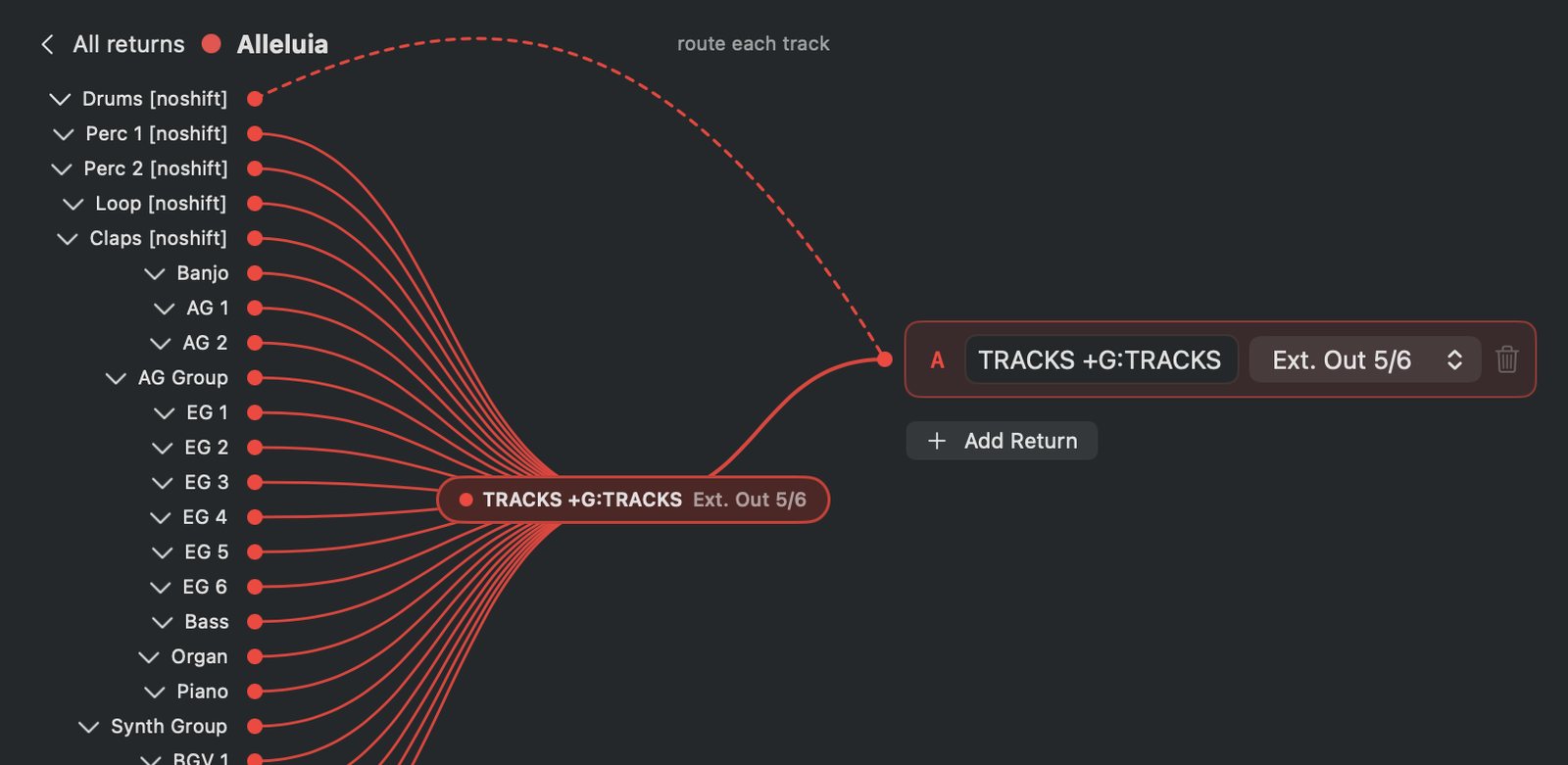
Four songs, four sets of returns, four ideas of what TRACKS means. StitchAble shows you a patchbay before it builds, every song's return wired to the one the set will actually have, each on its own output. Confirm it once and it remembers.
Every song's click and guide lanes collapse into one of each, running the whole show, playing the sounds and the voice you picked, in the language you picked. Not twelve different clicks from twelve different sources.
Need one loop out its own output, or a cue track just for the drummer? Zoom into any song and route stems individually, straight to a return, or past them entirely. Remembered with the rest of the set.
How it works
Choose the folder where your song projects live. StitchAble reads each song's title, artist, key, BPM, and time signature from the folder names.
Search or filter your library, drag songs into the running order, and set any per-song transpositions.
Hit Create Set and StitchAble merges everything into one Ableton project, markers, tempos, meters, and transpositions handled.
That's it.
Building the set
Pick a key. Your library regroups around it: what's already in key, and, side by side, what sits just below and just above, with the exact distance on every row.
Tap one and it lands in the set already transposed into key. Filter by tempo at the same time and you've found the one song that can follow the one you just placed.
Song to song
Between any two songs, choose how the next one lands: a bar of gap, gapless so it starts the instant the last one ends, or an overlap where the outgoing song's final bars play under the one coming in. Both play at their own tempo, nothing stretched, and a meter change is flagged right at the boundary.
Not sure a seam works? Hit the play button beside it. StitchAble auditions just that seam in a couple of seconds, the outgoing tail meeting the incoming start, in the key and overlap you picked, without building the whole set. A quick does-this-feel-right before you commit.
The part nobody else does
Merging songs is the easy half. The half that ruins a Sunday is routing, two songs both have a return called TRACKS and mean different outputs, a Live 11 song sends one to Master and means nothing at all. Get it wrong and Live resets your routing, or won't open the file.
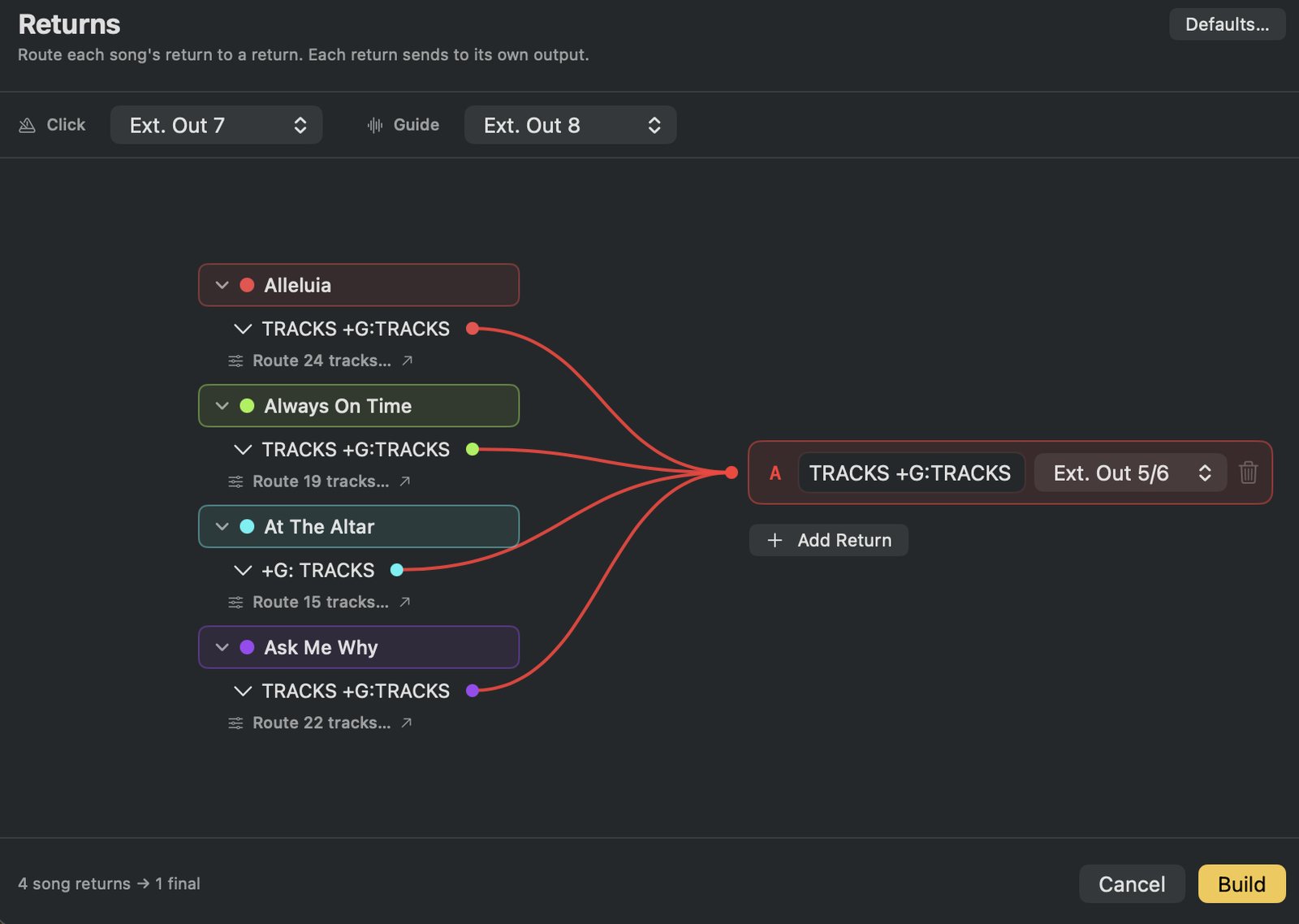
So StitchAble shows you the plan before it builds: every song's return, wired to the return the set will actually have, each on its own output. Rename them, merge them, split them, send a single stem somewhere of its own. Press Build, and the next time you build the same songs, it comes back exactly as you left it.
When one stem needs to go somewhere else
A loop that shouldn't hit the house. A cue track only the drummer hears. Zoom into any song and every stem is there, ride its return, send it straight to a different one, or give it a bus of its own. Saved with the rest of the set, so you do it once.
More from me
StitchAble merges your finished songs into one gapless set. BuildAble 12 is what turns a MultiTracks download into one of those finished songs in the first place: click, spoken guide cues, sections, lyrics, routing.
They share one engine and one sound library, so the voice and click you set up in one are the same files the other one plays. And a song BuildAble writes is already named exactly the way StitchAble reads it.
See BuildAble 12 →A MultiTracks download → a finished Live 12 song.
Your finished songs → one gapless setlist.
One sound library. One engine.
Try it first. Buy it if it earns its keep.
StitchAble is free to download and build with: up to 10 sets, 3 songs each, with every feature working. When you are ready, the license key from your purchase lifts the caps in the app you already have, so there is nothing to reinstall. No subscription, and free quality-of-life updates.
macOS 14+ · Ableton Live 11 or 12 · one online activation, then offline
Who it's for
Worship leaders, music directors, and live musicians who run multitracks in Ableton Live and build combined sets for services, shows, and tours. If you've ever rebuilt a tempo map by hand before a show or a service, this is for you.
Questions
The whole app. Every feature works, including transitions, the seam preview, transpose, click, guide, and Live 11 or 12 output. The only limit is size: up to 10 sets, and up to 3 songs in each. When you buy, the key lifts the caps in the app you already have, so there's nothing to reinstall.
No. StitchAble reads your songs and writes a brand-new combined set. Your originals are never touched.
Yes, that's a big part of the point. Unzip the download into your songs folder and change nothing. StitchAble looks for the Live 8 set sitting next to its MultiTracks folder of stems, converts it into a clean Live 11/12 project, and merges it in automatically alongside your own songs. No renaming, no conversion step.
Tag those stems [noshift] and StitchAble leaves them exactly as they are while it transposes the pitched instruments.
Yes. The click and guide sounds come with StitchAble, so there is nothing to download before your first set. Pick a voice family, English, Spanish, French, Portuguese, or add the MultiTracks samples or your own recordings, and choose the sound and pitch of every click pad. StitchAble folds each song's existing guide and click lanes into one of each for the whole set and plays them with what you chose. Set it up once; it's shared with BuildAble 12 too.
Turn on the AUPitch option in Settings. Warping multitrack stems to a new tempo doesn't always go well, songs can come out audibly longer or shorter. AUPitch sidesteps the warp engine, so the song plays at the tempo you asked for and keeps its key. It ships with macOS, so the set still opens on any Mac.
No, a one-time purchase with free quality-of-life updates.
Possibly, down the road, for more advanced workflows. This version stays yours and supported either way.
Built and tested on Apple Silicon with Ableton Live 11 and 12. If you're on Intel or an older Live version, message me before buying and I'll help confirm it works.
Just once, to activate. The first time you open StitchAble you paste your license key, that's the only moment it needs the internet. After that it runs entirely offline, so you're covered when the WiFi isn't.
Each purchase includes 5 activations, enough for a typical team: the MD's laptop, a backup, the booth machine, and a couple to spare. Activation is one online check per Mac, and after that StitchAble runs entirely offline. Reinstalling or adding machines? Email [email protected] and I'll sort you out, I'd rather help than make it annoying.
Yes, read the whole thing online, and it ships with your purchase as a PDF. It walks through folder setup and naming, building a set, the Returns review, guide and click, transpose behaviour, output routing, and troubleshooting.
Build them in minutes instead. Try it on your own songs first.
 StitchAble